


A secure laptop travel case needs to do more than look substantial. It should fit your device, suit your journey, and provide the kind of physical enclosure you want. Keep in mind that physical and digital security are different: RFID blocking can help protect contactless cards, but it does not secure files stored on your laptop.
This guide explains how to assess fit, compare case styles, and weigh travel-ready details such as TSA-approved locks. ALEON offers an all-aluminum laptop case with all-aluminum construction, a full-length piano hinge, weatherproof seals, TSA-approved locks, and built-in RFID protection. Understanding what each feature does, and what it cannot do, helps you choose a secure laptop travel case that suits the way you travel.
Key Takeaways
- Choose a secure laptop travel case for its enclosure, access features, and fit, not as a guarantee against theft.
- Measure your laptop and compare it with the specific case’s dimensions. Don’t assume one model fits because another does.
- Match the case style to your journey by weighing a structured hard case against a sleeve or a padded backpack compartment.
- When comparing stated construction details, consider ALEON’s all-aluminum laptop case, including its full-length piano hinge and weatherproof seals.
What Makes a Secure Laptop Travel Case Different?
A secure laptop travel case combines a physical enclosure, access features, and a fit suited to your device. It can help reduce exposure to everyday travel risks, but it cannot guarantee that a laptop won’t be stolen or damaged. A structured hard case provides a defined outer shell. A sleeve or padded backpack compartment offers a softer layer of separation within a larger bag. Consider how you carry your laptop and how much structure your journey calls for.
Construction and closure details help you understand what a case is designed to do. An all-aluminum case with a full-length piano hinge provides a structured enclosure, while a lock can control access to its contents. TSA-approved locks are designed for use within the Travel Sentry system; learn more about Travel Sentry and TSA-approved locks. A lock adds an access-control measure, but it does not guarantee theft prevention.
Which risks can a laptop travel case help address?
A case creates a physical barrier between a laptop and surrounding items in transit. Its structure can help shield the device from everyday contact, such as pressure from other belongings. The level of protection depends on the case design and fit. If the laptop can shift inside, the fit may not be right; careful packing and handling still matter.
A case can help protect the laptop’s hardware, but it can’t secure the data stored on it or guarantee it will remain in your possession. Digital safeguards, such as strong account passwords and device encryption, address different risks from case construction. RFID protection is also separate: it concerns RFID-enabled items, not files or access to the laptop itself. Knowing these limits helps you choose a secure laptop travel case for the protection you need.
How to Evaluate a Secure Laptop Travel Case Before You Travel
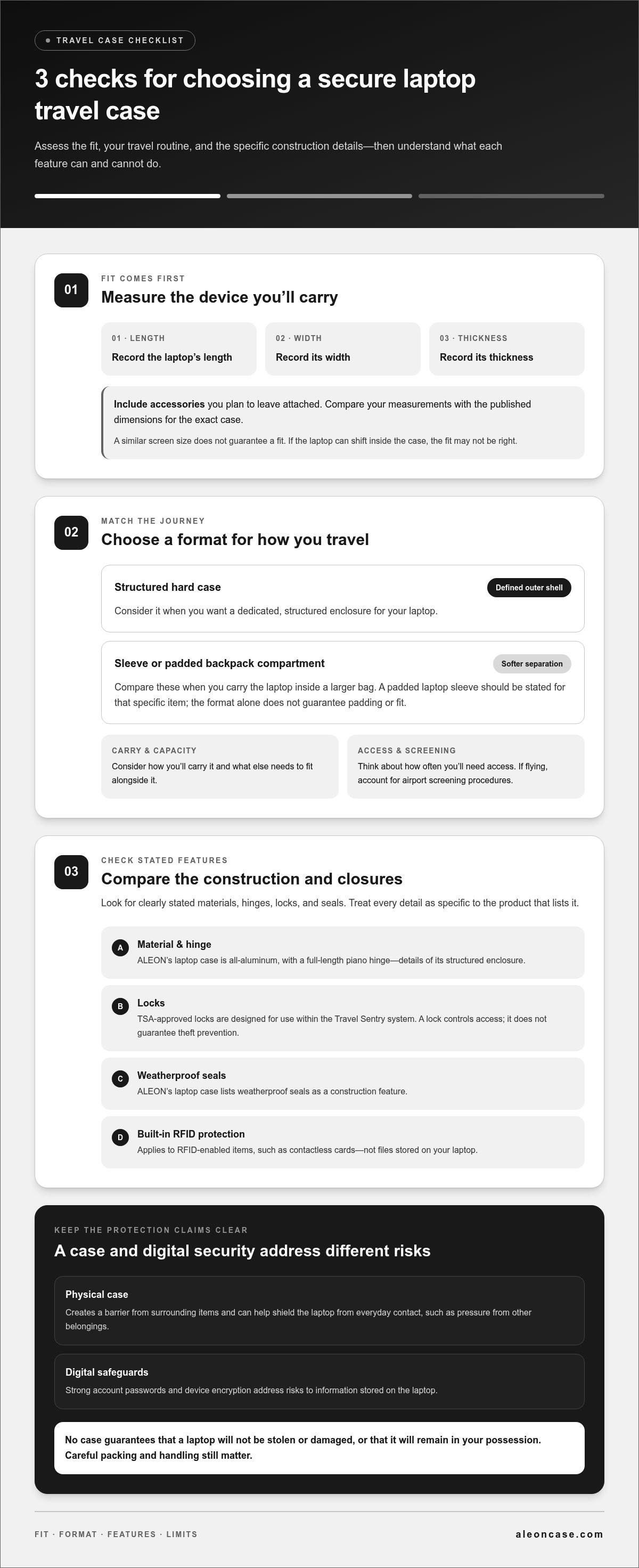
Compare fit, travel needs, and the features listed for the specific case. This simple sequence can help you narrow your options before departure.
- Measure your laptop. Record its length, width, and thickness, including any accessories you plan to leave attached. Compare those measurements with the dimensions published for the exact case. Don’t assume a case will fit because it accommodates another laptop with a similar screen size.
- Identify your travel needs. Consider how you’ll carry the laptop, what else needs to fit alongside it, and how often you’ll need access during the journey. If you fly, account for airport screening procedures and consult the TSA Guidelines for Laptops. A laptop you use frequently during travel may call for a different setup from one packed away for the trip.
- Compare construction and closures. Look for clearly stated materials, hinges, locks, and seals. Decide which details matter for your routine, and treat each feature as specific to the product that lists it. A stated feature is not a guarantee against theft or damage.
What should you check for fit, access, and protection?
Use the dimensions and feature details for the particular case you’re considering. A sleeve or backpack compartment is a relevant comparison only when that item specifically states it has a padded laptop sleeve. Don’t assume that padding or a particular fit comes with the format alone.
For a structured option, ALEON’s all-aluminum laptop case features all-aluminum construction, a full-length piano hinge, TSA-approved locks, weatherproof seals, and built-in RFID protection. Review the details for the particular case rather than transferring features between models. ALEON’s aluminum luggage offers other structured case options to consider as you choose a secure laptop travel case.
Choosing an ALEON Secure Laptop Travel Case for Your Journey
ALEON’s all-aluminum laptop case suits travelers looking for a structured enclosure with clearly stated access features. It has all-aluminum construction, a full-length piano hinge, TSA-approved locks, weatherproof seals, and built-in RFID protection. These features have different purposes: the construction and hinge define the case, the locks control access, and RFID protection applies to RFID-enabled items, not files stored on your laptop. No case can guarantee theft prevention or replace digital security practices.
When does an all-aluminum laptop case suit your travel routine?
A structured case may suit trips where you want a dedicated enclosure for your laptop and prefer durable construction to carrying the device in a softer compartment. Consider how you’ll transport it, how often you need access, and whether the specific case dimensions fit your device. A padded sleeve or backpack compartment is not the same as a dedicated case, and it does not automatically have the same structure or security features. Refer to a backpack’s padded laptop sleeve only when that feature is stated for the backpack.
For broader travel-security planning, the Defense Logistics Agency’s Security Best Practices for Traveling with Laptops offers guidance on protecting portable electronic devices, including their information. ALEON’s Limited 10-Year Worry-Free Warranty is valid when registered on its website. Review the warranty terms and complete registration to activate the coverage.
If a structured format suits your routine, explore ALEON’s aluminum travel cases to compare case formats and find a secure laptop travel case suited to your journey.
Make Your Next Journey Feel More Considered
Your travel setup should support the way you work. Before your next trip, think about how often you’ll need your laptop, what else you’ll carry, and how you want your setup to feel throughout the day. A secure laptop travel case is most useful when its fit and format work naturally with your routine.
Before departure, organize your work essentials and prepare your device for the journey. A little planning can make it easier to move between travel and work without searching through your belongings. Explore ALEON’s aluminum travel cases and choose a format that suits your travel routine.
Frequently Asked Questions
Can a TSA-approved lock keep a laptop case secure during airport screening?
Not completely. A TSA-approved lock is designed to allow authorized screening access, but it can’t guarantee that a case won’t be opened or that its contents can’t be stolen. Keep valuable work equipment with you when practical, and treat the lock as one access-control measure. It supports screening convenience, not uninterrupted custody.
Are weatherproof seals the same as waterproof protection?
No. ALEON’s stated feature is weatherproof seals, not waterproof protection. That wording does not guarantee that a case or its contents will remain dry in every condition. Consider the seals as one part of the case’s construction, and take sensible steps to keep electronics away from spills and prolonged exposure to moisture.
Can I bring a laptop case as a personal item on a flight?
Possibly, if its dimensions meet the airline’s personal-item rules and it can be stowed as required. A secure laptop travel case is a rigid item, so it won’t compress to fit a sizing frame. Check the carrier’s current size allowance before departure, including handles. A laptop being allowed in the cabin doesn’t automatically mean its case qualifies as a personal item.
Does RFID blocking protect files stored on a laptop?
No. RFID blocking is meant for compatible contactless items, such as payment cards or passports, not files saved on a laptop. For work documents, use device-level protections such as encryption and a strong login credential, and avoid leaving the computer unlocked in shared spaces. These steps address access to stored information, which a case feature can’t control.


